More lawyers and law firms are placing PDF files online for clients and potential clients to read or download. The conventional wisdom has always been to avoid placing too much information in PDF files on your website because Google and other search engines wouldn’t index them well or at all, so you wouldn’t get “credited” for your online content. It turns out that is not so true now and there are many ways to make your PDFs posted online much more SEO friendly. As more law firms place more PDF’s online this is good information.

Check out 13 Tips to Make Your PDFs SEO Friendly from Search Engine Journal.

As videoconferencing exploded in 2020, Zoom went from something most lawyers had never heard of to something many used every day. Zoom became a verb and, after months of a changed business environment with many videoconferences, many people now complain of Zoom fatigue.

While there are many video conferencing tools, Zoom zoomed to prominence for two reasons: 1) It was very easy to operate and 2) the free version was very useful.

But there is big money in business videoconferencing and we are going to see quite a battle between Zoom and Teams (at least on the small business level.) It is always good to understand the features that you may want in a business tool, so check out 6 Microsoft Teams features Zoom doesn’t have.

Lawyers are often concerned about the ethics rules requirements of understanding “the risks and benefits of relevant technology.”

But you do have to competently protect your clients’ digital information and you would be wise to protect your own digital information, particularly your online financial accounts. One of the major steps in protecting digital information is using multi-factor authentication for the online services you use. Fool is a strong word. But read this great column by these two legal tech experts to see why they used it. What Kind of Fool Am I (That Doesn’t Use MFA)? by Sharon D. Nelson, Esq. and John W. Simek

Today if something breaks, we often discard it and buy a new one. But to try a self-repair today, a website you should visit is www.ifixit.com/. The site’s theme is “Repair guides for every thing, written by everyone.” The site was recently profile on the CBS Morning News story “Fighting for the right to repair your own stuff.”

Today, the legal technology community is in mourning. We lost Gayle McCormick O’Connor, who was truly one of a kind! Tom and Gayle O’Connor have been a fixture at legal tech conferences for decades. You never knew what fascinating stories they would have to share. It is a cliche, but Gayle could light up a room just by entering. She liked people. Gayle will be missed. Many of us from all across the country are feeling her loss today. Bob Ambrogi wrote a fitting tribute RIP: Gayle McCormick O’Connor.

Show Desktop button
You need to hunt to locate Show Desktop

For those who were used to 2 or 3 monitors and found themselves working from home with a single monitor it was common to have many open windows, stacked on top of the desktop. If you needed to access your desktop, drilling down to the desktop by minimizing many open windows be time-consuming— and you may have had them arranged a certain way for a reason.

Show Desktop is what you need for this situation, but its icon is hidden to the point of almost invisibility in Windows 10. It is a little nondescript vertical line in the far right of the Task Bar, right of the notifications icon.

How to Quickly Show Your Desktop on Windows 10 from How-To Geek covers everything you might want to know about using Show Desktop.

You need to hunt to find Show Desktop

Why not try it right now, if you are using a PC? When you locate it and hover over it, you will see the desktop, with the borders showing open windows. Clicking on it will reveal the desktop and clicking on it again will restore the view to the original look.

If you have not used this before, try it a few times so you are familiar with its operation.

But when the icons are difficult to use, that just means there should be a keyboard shortcut, right? And there is.

The Windows key plus the D key (for desktop) lets you toggle back and forth easily without trying to position your cursor over the tiny little vertical icon. Try that a few times. This is definitely the easiest method for me.

Trial presentation software and presentation tools have become a part of many trial attorneys’ lives. Many hearings do not require these tools. But today’s jurors are used to receiving information via videos and graphics. Every trial lawyer has seen the jurors pay close attention to well-crafted charts or photographs of the accident scene displayed on a big screen in the courtroom.

Those of us who lug screens, projectors and laptops to various venues to do presentations or trials have become adept at setting this equipment up and traveling with a few extra batteries and cables.

In Still Using a Screen and Projector: Think Again my friend Stephen Embry suggests it is time for trial lawyers to consider an equipment change, replacing their screen and protector combination with a high definition TV. There are several reasons why this is good advice.

He quotes David Notowitz, founder of the National Center for Audio and Video Forensics, from his appearance on our Digital Edge podcast Best Practices for Audio and Video Evidence: Avoid Mistakes in Court! with several compelling reasons why TV’s are now better. As someone who has now devoted many hours scanning a new county bar presentation venue to calculate screen and projector placement, considering lighting, electrical outlets and whether everyone can see the screen and me while I talk, I agree with his observations as applied to courtrooms.

The good news is this will be a simpler process than the screen and projector because large screen lightweight TV’s are affordable today and the setup is less complicated.

Pandemic-Proof Your Practice

As the ongoing health pandemic continues to create challenges, it’s also served as a catalyst for law firms to get serious about effective disaster planning.

By Jim Calloway

(This article was written early in the pandemic and was published in the Big Ideas issue of ABA Law Practice Magazine in July 2020. Since it was written very early in the pandemic, some items are now obvious and others now appear dated. Even the title is a bit cringe-worthy. But the idea that our business continuity plans often paid little attention to epidemics and should at some point be updated with lessons learned )
The world has changed with the outbreak of the novel coronavirus (which causes COVID-19). Hopefully we never again experience a pandemic like that which we have seen, but the pandemic could be the impetus that will result in law firms getting serious about having up-to-date, effective disaster plans in place considering the lessons learned this year. A disaster plan is always important and helps with floods, errant sprinkler systems, hurricanes or wildfires that force employees out of the office; however, there are some law office planning considerations unique to pandemics.

CRITICAL DISASTER PLAN TOPICS

 One thing is clear in light of COVID-19.  Law firms of all sizes need to have disaster plans that include consideration of how the firm will continue to operate remotely.

Practice clear messaging. An important part of planning for a pandemic is assuring that your lawyers and staff receive clear messaging about what your law firm is doing and what you expect from your team. The Centers for Disease Control and Prevention (CDC) provided helpful information and recommendations for businesses online, and current epicenters and outbreaks of diseases, but law firm owners need to distill it into a plan of action that is flexible and responsive to the evolving situation.

We now understand there will be much incorrect information flowing about any crisis, especially through social media. Someone should be tasked with providing regular fact-based updates to all law firm employees.

Avoid community transmission. If you must maintain an in-office schedule: (1) direct staff to stay home or go home if they feel ill, (2) publish a point of contact within the firm, (3) get disinfectant wipes and hand sanitizer for the office and recommend everyone use them frequently, (4) remind everyone to wash their hands frequently, not shake hands or exchange hugs and to sneeze into their elbows, (5) arrange to disinfect the office regularly, (6) consider discontinuing use of a break room, and (7) devise a plan for use of bathroom stalls that limits the number of people sharing. Frequently contacted surfaces should be disinfected several times an hour. Consider rotating staff in shifts, so fewer people are on-site at one time.

We have all now learned a lot about working from home without access to a staffed central office. Your plan should reflect these lessons. An important aspect of remote work is effective management of staff.

Perform advance testing. Your plan should include a regular schedule to test remote work systems. Also, discuss specifically with staff and lawyers deemed eligible for remote work the logistics of how to proceed.

Talk about money. Talk with staff you have deemed not eligible to work remotely about their compensation while the office is closed. Be sensitive to employee needs and try to accommodate a short-term disruption where possible. Additionally, there may be those who can work remotely but whose compensation is affected.

Consider remote access security. Security measures are mission critical when working in the office but become even more important if your workforce goes remote. Law firms should analyze the specific security issues that must be addressed if a workforce goes remote. Law firms should establish security requirements for home offices, such as password-protected Wi-Fi. Consider whether the firm will supply a laptop and smartphone or require employees to use their own equipment (the so-called BYOD issue). Should the firm require a specific security package on employee devices? Does your firm have a site license that could be used? For laptops, basic security measures such as password protection, anti-virus, anti-malware and regular automatic updates are appropriate.

Physical security. Don’t omit the simple items from your plan, such as asking employees to close a door or find a private room in the home to provide more privacy when discussing client matters on the phone.

Address stress. Caution lawyers and staff about their stress reactions and implicit bias. COVID-19 has resulted in even some who are typically resilient melting down over something that would have typically been a minor annoyance. Staff and lawyers must recognize the stress at the root of some conduct and be more forgiving of others (and themselves). Stress reduction practices should be encouraged. Discuss xenophobia associated with diseases, especially when the firm serves diverse or vulnerable client bases.

SO, WHAT DID WE LEARN?

We gained a new understanding that the vast majority of U.S. law firms may have no option but to employ remote operations during a national crisis. We have also learned collectively that working from home has a totally different meaning and raises new issues when family members and bored children are added to the remote work structure.

During COVID-19, it became apparent that the skills to manage well in person do not always translate to managing well remotely. Different people adapt to new technologies and systems at different rates and in different ways. Teaching staff how to use remote communication tools proficiently, reiterating responsibilities in multiple ways, and managing staff through remote communication and task management programs will become essential. Law firms should consider and implement tools that will support effective remote workforce management.

It also became apparent that creative and effective teleworking policies are an important consideration in a pandemic-type crisis. For example, a policy that requires a lawyer be available and by her phone during business hours may require some flexibility. The policies that worked for remote workers without school closures vary from those required when children are at home. Law firms can use the lessons learned from COVID-19 to create workable policies for the future.

We have an extraordinary opportunity to get crucial feedback from the COVID-19 event. Sometime soon, when regular times return, every law firm employee and partner should be asked to compile an “after-action” report to assess how well their work-from-home tools functioned and what frustrations they experienced. This feedback should be used to revisit your emergency work plan to see where it should be revised.

HOW DID YOUR ORIGINAL PLANS AND SYSTEMS FARE?

One thing seems clear. Firms that had embraced paperless operations with complete client files securely accessible through a cloud storage or case management platform likely did much better than those more tied to physical paper and filing cabinets. Although law firm advisors and consultants have urged this approach for years, not all firms have become paperless or created remote access in a systematic fashion.

From the lessons of 2020, we predict that those clinging to paper may finally let go, and “safe in the cloud” will become the de facto law firm standard of information management for protecting both client information and continuity of business operations.

How did scanning work? While there may be little perceived need for printing and scanning in the home office because the work remained on the computer, there are times when the law requires a physical document. Law firms should revisit the availability of scanning equipment or alternatives and plan and train on effective processes for the future.

How did mail processing work? Many firms could not go 100 percent virtual because someone had to go in periodically and process the mail. This was key for those clients who pay by mailed check. Before COVID-19, we rarely contemplated mail instilling fear in staff. Add to this the complication of stay-at-home orders issued, and it becomes clear that law firms will need to address the handling of incoming mail moving forward. Law firms that did not switch to mail scanning services and electronic payments should revisit doing so.

Do you have a videoconferencing plan? Videoconferencing became huge. Zoom’s usage soared from 10 million users a day to 200 million, and “zooming” became a synonym for “holding an online meeting.” This was followed by “zoombombing” incidents where unwanted participants invaded and disrupted videoconferences. A debate over videoconferencing security and quickly added security features followed. Is your teleconferencing system secure and accessible to your staff and professionals? Have you considered a virtual office meeting to communicate current information or upcoming changes?

I predict the rise in use of videoconferencing will be one of the permanent results of COVID-19. After several months of regularly using videoconferencing tools, it will seem almost rude to drag someone into your office for a conference, particularly if your clients are elderly, immobile or winter temperatures are low.

What are your signature capabilities? Wet signature requirements became a pain point overnight. Lawyers realized

contracts, forms and documents could be reviewed fully over videoconferencing before signing, but some jurisdictions require wet signatures and witnesses on certain items. Lawyers sent the documents to clients and had to contend with delays and client mistakes. This spurred a conversation about signatures and virtual notary services, as well as underscored that lawyers need to understand all aspects of electronic signatures and remote online notarization in their jurisdiction.

How would your clients rate your emergency preparedness? Clients need more assurances than ever before. Law

firms that did this well started with messaging to clients who were potentially sick to not come into an appointment with you and preparing them to meet by videoconference or telephonically as well as explaining the COVID-19 effects on his or her case. As widely varying shelter-in-place and stay-at-home orders were issued by state and local authorities, firms had to update their public messaging. Firms reported if they were open for business and how best to contact them though their email auto-responses, websites and social media. Your firm needs to keep your clients in the loop and demonstrate that you are flexible and mobile-capable.

The CDC said in a teleconference that viruses still surprise. That has been borne out as the pandemic has progressed, and plenty of lessons and takeaways will be revealed later. Let’s hope this never happens again, but one thing is clear: Our business planning must now account for pandemic emergencies in the future.

WordRake is a great tool for lawyers to improve their documents and their writing skills.

I consider myself to be a good writer. But when I use WordRake to review a final draft, it always provides several helpful suggestions. It is a great tool if you need to cut a few dozen words out of a brief to comply with a page limit.

In our video, WordRake’s Ivy Grey, highlights how WordRake addresses typical problem areas in legal writing.

This is a great video to improve your writing skills whether you are considering subscribing to WordRake or not. Ivy identifies several common problem areas for lawyers like “throat clearing.”

Oklahoma Bar Association members can receive a discount on a one-year subscription and WordRake offers everyone a seven-day free trial. Oklahoma Bar members can obtain the WordRake discount code by logging into MyOKBar and selecting Practice Management Software Benefits.

Enjoy the video and scroll down below the preview to see links to Ivy’s additional tips on using WordRake.

Ivy’s WordRake Super User Tips

You have received a questionable email. You want to ask your IT Department if it is legitimate.

You have received a scam email. You want to warn others.

What do you do? Your next step is very important.

Do not forward the email!

You have received the data equivalent of a bomb, even if it is not exactly ticking. You want to render it harmless, not share it with others.

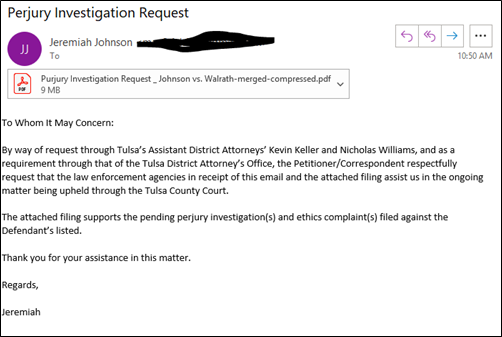
If you really want to ask your IT department or warn others (or if you want to preserve an image for use in a cybersecurity presentation later. I have friends who do that.) use the Snipping Tool to create an image of the email. The image you create will be totally harmless and should give the information anyone needs to identify the scam. In rare circumstances, your IT Department may want to have you forward it. But ultimately you will want to delete this email unopened.

If you don’t regularly use the Snipping Tool, type Snipping Tool into Windows search to locate it on your machine. Many of us use it so frequently we keep the Snipping Tool. It also has simple image editing tools that I used to make the redaction below.